Linux bash script recipes
Sep 19, 2022
 Simple protection in PHP against session ID injection (session hijacking & fixation)
Vulnerability of PHP session is often an issue. Apart from other security measurements, there are few ways to increase security of PHP application in an easy way. This article explains how you can protect against stealing your session ID from one computer and inject it into request from another computer.
Session IDs are transferred via server's super global array $_COOKIES and inserted into request headers with each request between client and server.
There are many ways how to find ID of your current session - e.g. via network sniffer tools
(e.g. Wireshark) or via Firebug.
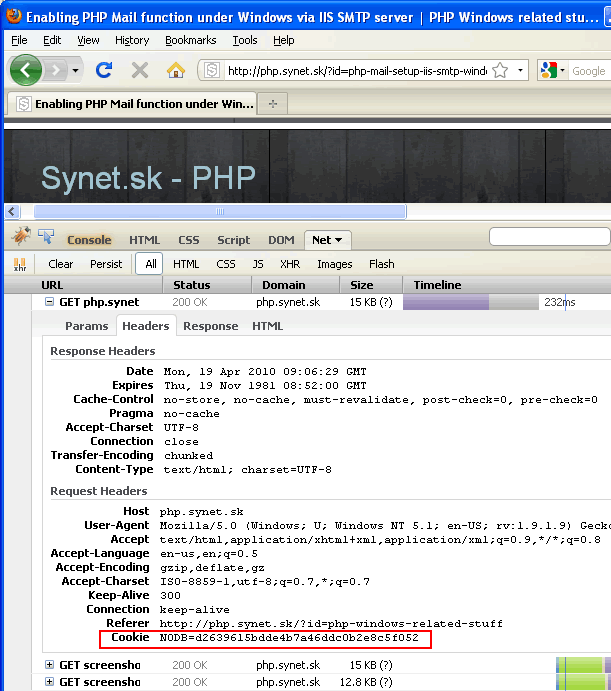
By reading this session ID and forcing it into request header from other computer (or attaching via GET request to URL), anybody can potentially get access to whatever you are doing on the web - e.g. to your bank account, personal details etc. Protecting against cross site session ID injection is one of the most basic preventions from hacking your site.
Here's how to start session and minimize possibility of stealing your current session ID.
Collect selected environmental variables dependant onto requesting client browser.
These variables are collected in superglobal arrays $_SERVER and $_ENV.
You can get full list of available variables via throwing phpinfo() command or read here in details about PHP predefined variables.
Usually I would choose following:
$_SERVER['REMOTE_ADDR']
// e.g. 192.168.1.20

$_SERVER['HTTP_USER_AGENT']
// e.g. Mozilla/4.0 (compatible; MSIE 8.0; Windows NT 5.1; Trident/4.0; .NET CLR 2.0.50727)
Variables above do exist in all webservers - IIS, Apache (httpd) and nginx. In order to limit validity of the session, we can also collect the date valid for actual day:
date('d.m.Y')
// e.g. '31.12.2010' - NOTE (!): session cuts off here after midnight
From selected variables above we will calculate simple hash string which we will use for generating session_id. Session ID is a unique random string automatically generated by PHP. Once we decide what values shall be included into session ID hash, we can collect all values into array:
$var[] = $_SERVER['REMOTE_ADDR'];
$var[] = $_SERVER['HTTP_USER_AGENT'];
$var[] = date('d.m.Y');
From collected variables we can calculate simple hash:
$hash = md5(implode('+',$var));
Once hash specific for current client calculated, we can set it as the name of current session:
session_id = $hash;
session_start();
// collect highly dependable environmental variables
$var = [];

// combine per session unique parameters
$var[] = $_SERVER['REMOTE_ADDR'];
$var[] = $_SERVER['HTTP_USER_AGENT'];

// limit session validity until midnight
$var[] = date('d.m.Y');

// calculate hash
$hash = md5(implode('+', $var));

// set session name from calculated hash
session_id = 'MySessId'.substr($hash, 0, 5);

// start session
session_start();
...
This is a very simple way with negligible performance overhead to minimize risk of injecting your session ID by another user. If such a attacker would use your session ID from another computer, he would most likely use different version of browser or different IP access address and thus your server will automatically start new session for him and will not interact with your session.
Of course, I will not argue, that risk will be eliminated completely, it will only get reduced significantly. If the attacker is able to use browser with exactly the same signature (same version, operating system etc), inject calculated headers, or if he is able to use your computer as proxy gateway - then this approach won't be much at help. The purpose of this article was to introduce a good programming practice for any serious PHP web application.
Got a question?
Professional development of web applications and custom solutions. Consultancy services.